


Leplayze
Frite...euse (jeu de mot)
Level 5
Level 4
Level 3
Level 2
Ancien staff
Level 1
Salut à tous ,
Après le projet Tesla qui n'a jamais vu le jour du au coût élevé (3000€ et illégal) d'achat d'un transformateur Très haute tension , je fais cette fois-ci la programmation d'un robot !
Petite photo :
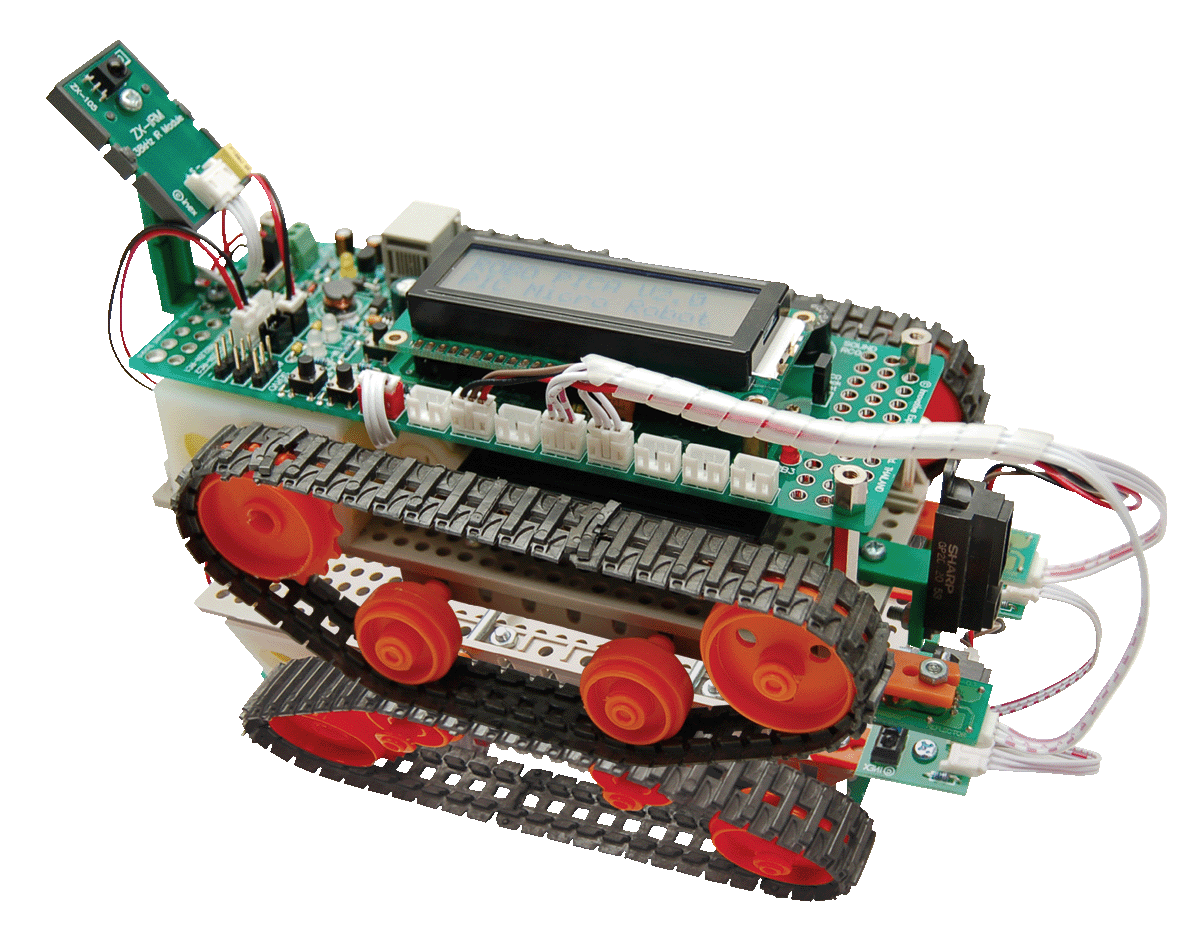
En quoi cela consistera ?
-Fabrication du robot ( Déjà terminé )
-Programmation du robot ( Je viens de commencer à y toucher ce ne sera pas en C mais en JAL : Just another language )
)
Ce projet sera fait à 100 % , et cette fois-ci tout rédigé pour que vous le fassiez chez vous sans soucis !
Mp si un problème de compréhension , je n'hésiterais pas à vous répondre .
Prix du robot : 30 € 100 €
Logiciel requis :
-Pickit
-Jaledit
-Proteus
J'ai actuellement fais kedal , excepté lire toute la documentation et j'ai démarrer la compréhension du langage JAL , en ayant activé un moteur :D
--------------------------------------------------------------
7 décembre :
Voilà une petite vidéo Mode manuel : Avec télécommande
[YOUTUBE]iu8XqfBx4IA[/YOUTUBE]
16 décembre :
Le code de la télécommande c'est exactement celui de la vidéo si vous avez des questions posez .
Après le projet Tesla qui n'a jamais vu le jour du au coût élevé (3000€ et illégal) d'achat d'un transformateur Très haute tension , je fais cette fois-ci la programmation d'un robot !
Petite photo :
En quoi cela consistera ?
-Fabrication du robot ( Déjà terminé )
-Programmation du robot ( Je viens de commencer à y toucher ce ne sera pas en C mais en JAL : Just another language
)Ce projet sera fait à 100 % , et cette fois-ci tout rédigé pour que vous le fassiez chez vous sans soucis !
Mp si un problème de compréhension , je n'hésiterais pas à vous répondre .
Prix du robot :
Logiciel requis :
-Pickit
-Jaledit
-Proteus
J'ai actuellement fais kedal , excepté lire toute la documentation et j'ai démarrer la compréhension du langage JAL , en ayant activé un moteur :D
--------------------------------------------------------------
7 décembre :
Vous devez etre connecte pour voir les liens.
Voilà une petite vidéo Mode manuel : Avec télécommande
[YOUTUBE]iu8XqfBx4IA[/YOUTUBE]
16 décembre :
Le code de la télécommande c'est exactement celui de la vidéo si vous avez des questions posez .
Code:
-------------------------- Robot télécommandé---------------------------
-- Réalisé par Censuré
-- Projet Informatique 1EMS : Henallux.
-- 2012-2013
------------------------------------------------------------------------

include 16f887                    -- target PICmicro
--
-- This program assumes that a 20 MHz resonator or crystal
-- is connected to pins OSC1 and OSC2.
pragma target clock 20_000_000     -- oscillator frequency
-- configuration memory settings (fuses)
pragma target OSC  HS              -- HS crystal or resonator
pragma target WDT  disabled        -- no watchdog
pragma target LVP  disabled        -- no Low Voltage Programming
pragma target MCLR external        -- reset externally
-- These configuration bit settings are only a selection, sufficient for
-- this program, but other programs may need more or different settings.
--
enable_digital_io()                -- make all pins digital I/O
--
--
alias   led3      is pin_B3
pin_B3_direction =  output

-- Config LCD
--
const byte LCD_ROWS    =  2           -- LCD with 2 lines
const byte LCD_CHARS   =  16          -- and 16 characters per line
--
alias     lcd_en       is pin_D3      -- data trigger
alias     lcd_rs       is pin_D2      -- command/data select.
--
pin_D3_direction       = output
pin_D2_direction       = output
--
alias     lcd_d4       is pin_D4
alias     lcd_d5       is pin_D5
alias     lcd_d6       is pin_D6
alias     lcd_d7       is pin_D7
--
pin_D4_direction       = output
pin_D5_direction       = output
pin_D6_direction       = output
pin_D7_direction       = output
--
include lcd_hd44780_4
--
lcd_init()                            -- init the lcd controller

-- Config ADC
const Left_ZX_03       = 0     -- AN0 (pin_A0)
const Right_ZX_03      = 1     -- AN1 (pin_A1)
const GP2D120          = 2     -- AN2 (pin_A2)
const pot              = 3     -- AN3 (pin_A3)

const byte ADC_NVREF            = 0              -- no external Vref
const word ADC_RSOURCE          = 10_000         -- 10K potmeter
const bit ADC_HIGH_RESOLUTION   = TRUE           -- high resolution

include adc                                      -- include ADC library

adc_init()                                       -- init library

set_analog_pin(Left_ZX_03)                -- init used ADC channel
set_analog_pin(Right_ZX_03)               -- init used ADC channel
set_analog_pin(GP2D120)                   -- init used ADC channel
set_analog_pin(pot)                       -- init used ADC channel


-- Config  Zx_IRM sensor

alias Zx_IRM is pin_B0
pin_B0_direction = input

const byte txt5[LCD_CHARS] = "   ER-4 Remote  "

var byte ir_cmd = 0
var byte key

-- Interrupt service routine INT

procedure pin_b0_interrupt is

   pragma interrupt

   if (INTCON_INTF) then

      _usec_delay(416)                 -- Delay 1/2 of 1 bit timing(baudrate 1200 bps)

      for 8 loop                     -- Loop for 8 time for keep data from ER-4 Remote

       _usec_delay(833)                -- Delay of 1 bit timing(baudrate 1200 bps)
       ir_cmd = ir_cmd >> 1          -- Shitt bit 1 time

       if((PORTB & 0x01)==1) then    -- Get logic @ RB0 = '1'?

          ir_cmd = ir_cmd | 0x80     -- Inset bit data is '1'

       end if

      end loop

      _usec_delay(833)                -- Delay of 1 bit timing(baudrate 1200 bps)

      INTCON_INTF= 0                 -- clear intf to re-enable pin b0 interrupts

   end if

end procedure

option_reg = 0b_1000_0000      -- disable pull-up and high-low edge detect
intcon     = 0b_1001_0000      -- enable interrupts general and port B
 --


-- Function for get character from Remote

function get_remote( ) return byte is

   var byte key

   key=ir_cmd                  -- Get character to buffer
   ir_cmd = 0                  -- Clear old data

   return  key                 -- Return character from Remote

end function


--  start button
alias start_main is pin_A4
pin_A4_direction = input

--
include delay
--
include print
--
include format

-- Variables
var byte Left_ZX
var byte Right_ZX
var byte GP2D_120
var byte measure
var byte dutycycle
var bit go = 0

-- LCD strings
const byte txt1[LCD_CHARS] = "    ROBOPICA    "
const byte txt2[LCD_CHARS] = "   Pic 16F887   "
const byte txt3[LCD_CHARS] = " Pour demarrer  "
const byte txt4[LCD_CHARS] = "Appuyer sur RA4 "

lcd_cursor_position(0,0)
print_string(lcd, txt1)
lcd_cursor_position(1,0)
print_string(lcd, txt2)

delay_1ms (2000)

lcd_cursor_position(0,0)
print_string(lcd, txt3)
lcd_cursor_position(1,0)
print_string(lcd, txt4)

const byte txt6[LCD_CHARS] = " Button A Press "
const byte txt7[LCD_CHARS] = " Button B Press "
const byte txt8[LCD_CHARS] = " Button C Press "
const byte txt9[LCD_CHARS] = " Button D Press "

-- Moteur
Alias Moteur1      is pin_C2          --Moteur droit
Alias Moteur2      is pin_C1          --Moteur gauche
Alias Sens1        is pin_D0          --Avance moteur gauche
Alias Sens2        is pin_D1          --Recule moteur gauche
Alias Sens3        is pin_B1          --Avance moteur droit
Alias Sens4        is pin_B2          --Recule moteur droit
pin_C2_direction   =  output
pin_C1_direction   =  output
pin_D0_direction   =  output
pin_D1_direction   =  output
pin_B1_direction   =  output
pin_B2_direction   =  output
Moteur1 = off
Moteur2 = off


forever loop

  if pin_A4 == 0 then

     go = 1

     lcd_cursor_position(0,0)
     print_string (lcd,txt5)                 -- Display message ER-4 Remote

  end if

    if go == 1 then

           key = get_remote()                     -- Get Remote

      if(key == "a" | key == "A") then      -- Boutton "A" pressé, en arrière
             Moteur1  =   on
             Moteur2  =   on
             Sens1    =   off
             Sens2    =   on
             Sens3    =   off
             Sens4    =   on
                      delay_1ms(50)
      end if

      if(key == "b" | key == "B") then           -- Boutton "B" pressé, à droite
             Moteur1  =   on
             Moteur2  =   on
             Sens1    =   on
             Sens2    =   off
             Sens3    =   off
             Sens4    =   on
                      delay_1ms(50)
      end if

      if(key == "c" | key == "C") then           -- Boutton "C" pressé, à gauche
             Moteur1  =   on
             Moteur2  =   on
             Sens1    =   off
             Sens2    =   on
             Sens3    =   on
             Sens4    =   off
                      delay_1ms(50)
      end if


      if(key == "d" | key == "D") then           -- Boutton "D" pressé, en avant
             Moteur1  =   on
             Moteur2  =   on
             Sens1    =   on
             Sens2    =   off
             Sens3    =   on
             Sens4    =   off
                      delay_1ms(50)

      end if

      if key == 0 then

             Moteur1 = off
             Moteur2 = off

      end if


      end if

end loop
Dernière édition:









![[A]pokah.](/data/avatars/l/257/257419.jpg?1504230395)